ESP-Now radio
Where: Panel › Radio Configuration · Serial menu r (Broadcast Override: s → n → 2)
ESP-Now is a direct radio link between MS2net reference stations: a base sends its RTCM corrections and the rovers in range receive them, with no router, no Internet and no extra hardware. It suits a base and rovers on the same site; for longer distances see RTK corrections. The stations also tell each other who is on the air (Stations heard), a relay repeats only for the rovers that need it, and a rover on an NTRIP caster can be the gateway for the others; the stations can also send their UBX data to a collector. A network built this way is described in Monitoring network.


Figure 1 — Animation: turning ESP-Now on
Setting Radio to ESP-Now brings up the radio MAC, the paired radios and the other fields.
It uses the same 2.4 GHz radio and ESP antenna as WiFi and Bluetooth. The base sends short packets straight to the rovers, and each rover hands them unchanged to its own GNSS module.

Figure 2 — Rear: shared ESP antenna
Quick setup
- Switch both stations on and place them close together. Keep WiFi off on both, or connect both to the same network (see Radio channel and WiFi).
- On each station choose E-Pair from the button menu: the display shows ESP-Now Pairing, and each station announces its address every half second.
- Wait until they hear each other: both store the other's address, set Radio to ESP-Now, save, show ESP-Now Paired for two seconds and start as rovers.
- On the station that will be the base, choose Base from the button menu. The rover needs nothing else: once the base transmits, the ESP-Now icon alternates with the up arrow on the base and with the down arrow on the rover (see Indicators).

Figure 4 — Animation: E-Pair from button menu
Pairing, then the other station becomes the base and the rover reaches RTK fix (times shortened).
| During pairing | What happens |
|---|---|
| Only one station is in E-Pair | It keeps announcing itself: there is no time limit. Leave with Exit in the button menu: the station goes back to rover or base and nothing is saved. |
| The stations were already paired | The address is not added twice; the pairing ends normally. |
| The list already holds five radios | The radio paired first is dropped and the new one is added: the last five stay. |
Pairing also works from the serial menu (r → 2, Scanning for other radio... until
Pairing complete, any key cancels), with a station that is in E-Pair from the button
menu.
No pairing needed
With Broadcast Override on (factory value), the base transmits to every station in range, even if it has never been paired. On a rover, setting Radio to ESP-Now and pressing Save is enough.
Settings
| Field | What it does | Values | Factory | Serial |
|---|---|---|---|---|
| Radio | Which radio carries the corrections: Off leaves them to the LoRa radio on the radio port, ESP-Now uses the internal radio. The two exclude each other: with ESP-Now the radio port neither sends nor receives corrections. The other fields appear only with ESP-Now. | Off, ESP-Now | Off | r → 1 (External only, Internal ESP-Now) |
| Radio MAC | Address of this station's radio, the one other stations store when paired. | read only | — | shown in r |
| Paired Radios | Stations paired with this one, one per line, or None. | up to 5 | None | shown in r |
| Forget All Radios | Empties the list at once, without Save (All radios forgotten.). The button stays grey until Enable Forget All Radios is ticked. The stations must then be paired again. | button | — | r → 3, then y |
| Broadcast Override | The base sends to every station in range with ESP-Now on, paired or not. Untick it when the base must send only to its paired rovers. | on, off | on | s → n → 2 |
| ESP-Now Network Key | Optional. With a key the base signs its packets and a rover takes only those signed with the same key: the base and all its rovers need the same key. See Network key. | up to 32 characters | empty | r → 5 |
| ESP-Now Relay | Rover only. The station sends again, unchanged, the corrections it receives from the base, when a rover out of reach of the base needs them. See Relay. | on, off | off | r → 6 |
| ESP-Now Gateway | Rover with the NTRIP client on only. The station keeps WiFi, takes the corrections from the caster and sends them over ESP-Now to the stations around, as a base would. See Gateway. | on, off | off | r → 7 |
| Send UBX over ESP-Now | The station sends over ESP-Now the NAV-PVT, RXM-RAWX and RXM-SFRBX messages its GNSS module puts out, switched on at their rate in Message Rates. The relays repeat them, and a collector saves them. See UBX data. | on, off | off | r → 8 |
| Collect UBX from ESP-Now | The station saves on its microSD card the UBX messages the other stations send over ESP-Now, one file per station and per day. Needs a microSD card. See UBX data. | on, off | off | r → 9 |
| ESP-Now stations heard | The other stations with ESP-Now on heard in the last minute, with role, signal, the relay each rover is asking and the position. See Stations heard. | read only | — | shown in r |
| Disable GNSS module UART2 with ESP-NOW | Serial menu only. Acts on the radio port only until the next rover or base start, when the port is set again from Radio: off with ESP-Now, on otherwise. | Yes, No | Yes | r → 4 |
To turn ESP-Now off without the page, use the serial menu:
r (Radios), then 1, which switches between the LoRa radio (External only) and
ESP-Now. Forget All Radios removes the pairings but leaves ESP-Now on.
Radio channel and WiFi
ESP-Now travels on a WiFi channel, and two stations hear each other only on the same channel.
| Station | What it does |
|---|---|
| Base | May stay connected to WiFi, for example to feed a caster with the NTRIP server: it transmits on the channel of that network. |
| Rover | With Radio on ESP-Now it keeps WiFi off and looks for the base's channel by itself: it listens on channels 1 to 13 in turn, 2 s each (about 26 s in all), and settles on the one where it hears the base best (from firmware 1.3.11 also when the base is on channel 1 or 13, which used to lose out to the channel next to it), so corrections arrive a few tens of seconds after the rover starts. If no corrections arrive for 3 seconds, the search starts again. Its network services (NTRIP client, TCP server and the others) are not available while it uses ESP-Now; with ESP-Now Gateway and the NTRIP client on it becomes a gateway instead. |
| Gateway | A rover with ESP-Now Gateway and the NTRIP client on keeps WiFi, like a base, and transmits on the channel of its network; the other rovers find that channel by themselves. |
| Pairing | The two stations must already be on the same channel: both off WiFi, or both on the same network. A WiFi reconnection does not interrupt a pairing in progress. |
In Config mode ESP-Now is off; it starts again in rover or base.
Range and link
- The range depends on the site: buildings, vehicles, the ground and stations placed low shorten it a lot. Test on site, watching the ESP-Now icon on the rover.
- The range also depends on Max WiFi Power, which limits the transmit power of ESP-Now too: less power, less range.
- The base sends the RTCM messages chosen in Base › RTCM Rates in packets of up to 250 bytes: a full packet leaves at once, the rest after 50 ms without new bytes, so one burst per second with the factory rates.
- Packets are neither encrypted nor acknowledged: the base sends each one twice, so that a single loss leaves no gap (see Packets and network key). Each RTCM message has its own check code and damaged ones are discarded; the rover only needs valid corrections every few seconds.
Packets and network key
Every packet of corrections carries a sequence number and a check. The base sends each packet twice, a few milliseconds apart; the rover passes on the first copy and drops the second, so a packet lost to interference no longer leaves a gap in the corrections. A packet whose check is wrong is discarded.
Update the rovers first
From firmware 1.3.8 the packets carry a header that earlier firmware does not know. A rover with firmware older than 1.3.8 that listens to a 1.3.8 base receives worse corrections. Update the rovers first, or all the stations together, never the base alone. A 1.3.8 rover still takes the corrections of a base not yet updated, as long as it has no network key.
Network key
Several ESP-Now bases close together would mix their corrections on the rovers. The ESP-Now Network Key keeps them apart: with a key the base signs every packet, and a rover takes only the packets signed with the same key. Give each base and all its rovers the same key, and different bases different keys.
| Base | Rover | Result |
|---|---|---|
| no key | no key | accepted, also from stations with older firmware |
| key | same key | accepted; packets of other bases are discarded |
| key | no key, or a different one | rejected: the rover loses the RTK fix |
| no key, or older firmware | key | rejected: the rover loses the RTK fix |
The key is set in Radio Configuration, field ESP-Now Network Key, followed by
Save, or in the serial menu with r → 5: the menu shows (set) or
(none - packets not signed), and an empty answer removes the key. Like the passwords, the
key stays out of the configuration file downloaded without Include passwords (see
System › Configuration file).
Counters
On the rover, the serial menu r counts the packets received since the start:
Packets since start: N copies dropped, N rejected (wrong key or check), N old format accepted, N relayed
| Counter | Meaning |
|---|---|
copies dropped |
normal The second copies: it keeps growing while corrections arrive. |
rejected |
check Packets with a wrong key or check. If it keeps growing, the base and the rover do not have the same key. |
old format accepted |
update Packets from a base with firmware older than 1.3.8: update the base. |
relayed |
relay Packets this station has sent again as a relay, each one twice. It stays at 0 with ESP-Now Relay off, and stops growing while no rover asks for the relay. |
From firmware 1.3.18, with Send UBX over ESP-Now or
Collect UBX from ESP-Now on, or once the station has heard UBX data
from other stations, the menu r also counts the UBX data:
UBX since start: N bytes sent (N frames not sent, N packets refused by the radio), N heard from others, N saved (N not)
| Counter | Meaning |
|---|---|
bytes sent |
sending Bytes of this station's UBX messages sent over ESP-Now. |
frames not sent |
too much data UBX messages left behind because the queue was full or the radio was not ready: fewer messages or lower rates. |
packets refused by the radio |
radio ESP-Now packets the radio did not accept to send. |
heard from others |
collecting UBX bytes received from the other stations, copies excluded. |
saved (N not) |
microSD Bytes written on the collector's microSD card; in brackets the packets that found no room: if it grows, the card is missing, full or slow. |
While ESP-Now is on, the serial port also prints one line a minute with the traffic of the
last minute: ESP-Now: last minute N bytes sent, N received, channel N, peers N, copies
dropped N, rejected N, old format N, relayed N.
Stations heard
From firmware 1.3.16 every station with ESP-Now on, base or rover, sends a short line every 2 seconds with who it is and how it is doing, and keeps the lines it hears in a table: who is on the air, how well each station is heard, and which relay each rover is using.
| Column | What it shows |
|---|---|
| Station | The unit ID: the last four characters of the station's address, the same as in the Bluetooth name and on the display (for example 173E). |
| Role | Base a base transmitting its corrections (not during survey-in); Gateway a gateway sending the caster's corrections, received in the last 5 s; Relay a rover with ESP-Now Relay ticked that has received corrections in the last 5 s; Rover any other station, also a base, gateway or relay with no corrections to give. |
| dBm | Signal of its last line, with the same steps as the arcs of the ESP-Now icon: below -80 dBm the link is at its limit. |
| Age (s) | Seconds since its last line: normally 0 to 2. A station silent for a minute leaves the table. |
| Relay | On a rover, the relay it is asking to repeat the corrections, or - while it hears the source well (see Relay). |
| small line | Firmware, how long the station has been on (on for N min), its free memory (N KB free) and, from firmware 1.3.18, its position: latitude, longitude, height in metres and solution (3D, RTK float, RTK fix). Without a solution the position is not shown. |
- The lines go to every station in range, whatever Broadcast Override and the pairings say.
- With a network key the lines are signed like the corrections: a station
lists only the stations with the same key, and the lines of the others count as
rejected. - Stations with firmware older than 1.3.16 send no line and are not listed. Those with
firmware 1.3.8 to 1.3.15 discard the lines of the others and count them as
rejected: on them that counter grows even with the right key. - The table holds eight stations: when it is full, the one silent longest makes room.
- Stations with firmware older than 1.3.18 send no position. In the serial menu the position
is on an
atline under the station.
On the page the table is under Radio Configuration, ESP-Now stations heard, or
None in the last minute. In Config mode ESP-Now is off, so the page shows the stations
heard in the minute before entering Config, and they leave one by one. To follow the network
live, use the serial menu r on a station in rover or base (see
Menu map › Radios): the table is printed each time the
menu is shown, followed by the state of the relay or of the gateway on the stations that
have one of them ticked.
  Stations heard:  id    role     signal  age  uptime  memory  firmware  asks relay
                   173E  base      -58 dBm   1s    312 min   92 KB  v1.3.18   -
                         at 45.80000000, 13.50000000, 102.40 m, 3D
                   5A21  rover     -74 dBm   0s     47 min  101 KB  v1.3.18   9C04
                         at 45.80100000, 13.50200000, 98.70 m, RTK float
  This relay is repeating
Here the menu is open on relay 9C04: rover 5A21 does not hear base 173E well and asks
this relay, which therefore repeats. While the serial menu is open the station sends no line
of its own: read the table and leave the menu, since a relay left in the menu for more than
15 s is no longer asked.
Relay
When a rover is out of reach of the base, another MS2net rover placed in between can pass the corrections on. With ESP-Now Relay ticked the station is ready to repeat; from firmware 1.3.16 it repeats when a rover needs it, and then sends again every new packet it receives, unchanged and twice, like the base.
- Every 5 seconds a rover judges how it hears the source, the base or the gateway: if it does not hear it, or loses more than one packet in five, it asks in its line for the relay with corrections it hears best. When the source comes back clean, it stops asking.
- The relay repeats for 15 seconds after each request; every line of the rover (every 2 s) renews them, and 15 s after the last one the relay stops.
- A relay that hears no rover with firmware 1.3.16 or later repeats all the time, as before, so it also serves rovers with older firmware.
- A relay that does not hear the source well asks another relay in the same way, so the corrections cross several hops.
- If the relay in use goes silent, after 3 s without corrections the rover searches the channel again and asks the best relay it hears: about half a minute in all (see Monitoring network).
Update every station
A rover with firmware older than 1.3.16 never asks. A 1.3.16 relay repeats for it only while it hears no rover of 1.3.16 or later: as soon as one is in range, the relay repeats only on request, and the older rover may be left without corrections. Update all the stations of the site together: base, gateway, relays and rovers.
| Point | What happens |
|---|---|
| rover only | The relay works only in rover mode; on a base the setting does nothing. The relay is a rover in every respect: it uses the corrections itself and reaches RTK fix like the others. |
| UBX data | From firmware 1.3.18 the relay always repeats the UBX data of the other stations, even when no rover asks it, and drops the copies it has already heard. |
| no loops | Each packet keeps its sequence number, so a rover that hears both the base and the relay takes the first arrival and drops the other as a copy, whoever sent it. A relay that hears another relay does the same: with several relays a packet never goes round in circles. |
| key | The relay passes the packets on as the base signed them. Like any rover it takes them only with the same network key: give the relay the same key as the base and the rovers. |
| firmware | Packets from a base with firmware older than 1.3.8 have no header and are not relayed: update the base. |
| channel | The relay finds the base's channel like any rover, and the rovers beyond it find the same channel (see Radio channel and WiFi). |
| addresses | With Broadcast Override on the relay (factory value) it repeats to every station in range; with it off, only to its paired radios. |
To set it up:
- Set up the base and the rovers as usual (see Quick setup).
- On the station in between, in Radio Configuration, tick ESP-Now Relay and press
Save (serial menu:
r→6). Start it as a rover. - Place it where it hears the base and the rovers beyond. Nothing changes on the other rovers: they ask the relay by themselves when they do not hear the base well.
On the relay, the serial menu r shows This relay is repeating while it repeats, and the
relayed counter keeps growing (see Counters), or
This relay is quiet: no rover asks for it. In the stations heard the
rover that asks shows the relay's ID in the Relay column. If the relay is switched off or
moved away, the rovers that hear only that relay ask another one; with none in range, they
are left without corrections.
Gateway
From firmware 1.3.16 a rover can bring the corrections of an NTRIP caster to the ESP-Now stations around it, with no base on site. A rover with Radio on ESP-Now, ESP-Now Gateway ticked and the NTRIP client on keeps WiFi, takes the corrections from the caster and sends them over ESP-Now as a base would: each packet twice, signed with the network key if there is one. A rover with the NTRIP client on but ESP-Now Gateway off stays an ordinary ESP-Now rover, with WiFi off.
| Point | What happens |
|---|---|
| own use | The gateway uses the caster's corrections itself and reaches RTK fix like a rover on a caster, also while it waits. It ignores the ESP-Now corrections of the other stations and does not repeat them. |
| one at a time | With several gateways only the one with the lowest station ID sends; the others keep the caster for themselves and wait. If the one sending goes silent, after 15 s the next one takes over by itself. |
| base first | A gateway stays quiet while, in the last 15 s, it has heard corrections from a base, from a gateway with a lower ID, or from a station with firmware older than 1.3.16, which sends no line and could be a base. A base still in survey-in sends no corrections and silences nobody. |
| channel | It transmits on the channel of its WiFi network, like a base on WiFi; the rovers find that channel by themselves (see Radio channel and WiFi). |
| network service | With a network service (VRS, nearest mount point) the caster computes the corrections for the gateway's position: keep the rovers within a few hundred metres of it, the reach of ESP-Now anyway. |
| relay | Leave ESP-Now Relay off on a gateway: it does not repeat, and a rover could ask it in vain. |
On the gateway, the serial menu r shows This gateway is sending the caster's corrections
or This gateway is quiet: another source is sending. In the
stations heard the gateway sending has the role Gateway; one that is
waiting shows as Rover.
To set it up:
- On the station that will have Internet, follow RTK corrections › Rover on an NTRIP caster: WiFi network, NTRIP client, Startup Mode on Rover.
- Before Save, in Radio Configuration, set Radio to ESP-Now, tick
ESP-Now Gateway (serial menu:
r→7) and type the network key of the site, if any; then Save and Exit. - On the other rovers set Radio to ESP-Now and leave ESP-Now Gateway off. They find the gateway's channel by themselves, and in their table of stations heard the gateway has the role Gateway.
UBX data
From firmware 1.3.18 a station with Send UBX over ESP-Now sends over
ESP-Now the NAV-PVT, RXM-RAWX and RXM-SFRBX messages of its GNSS module, switched on in
Message Rates, in packets with its ID and a number, each one twice.
The relays always repeat them, and a station with
Collect UBX from ESP-Now saves them on its microSD card, one file per
station and per day (ESPNOW_<ID>_<yymmdd>.ubx), to download with the
File Manager. Stations with older firmware drop these packets.
How they travel, how to set it up and how much arrives are in Monitoring network › Data of every station to a collector; the counters are in Counters.
Indicators
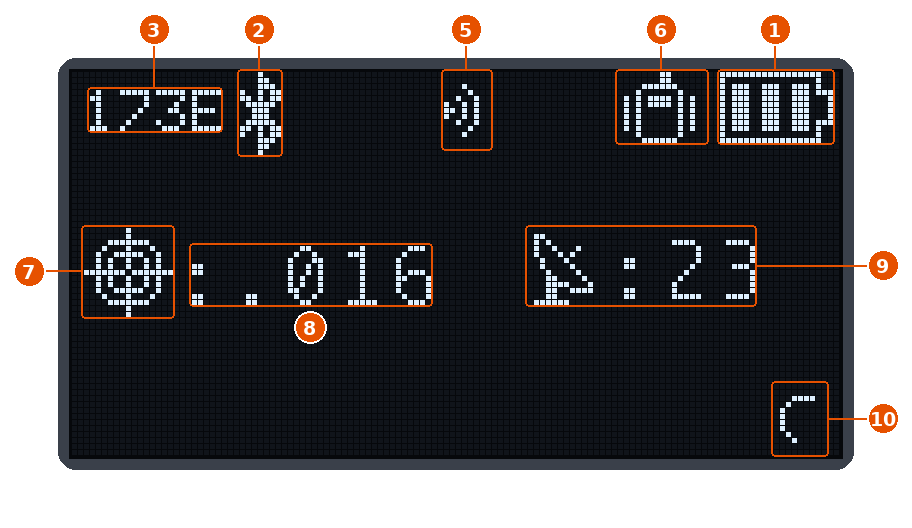
Figure 5 — Rover receiving over ESP-NOW
| No. | Icon | Meaning |
|---|---|---|
| 5 |  |
ESP-Now link: while corrections arrive, 0 to 3 signal arcs alternate every half second with the down arrow. |
| 6 |  |
Mode: with ESP-Now on, on a rover as on a base, the icon next to the battery is always the mode icon and never the WiFi symbol, even with WiFi on. |
Rover in RTK fix with corrections from a paired base, phone on Bluetooth, WiFi off. The other numbers are in The display › RTK fix.
| Where | What it shows |
|---|---|
| Display, base |  The ESP-Now icon alternates with the up arrow while the base transmits. The ESP-Now icon alternates with the up arrow while the base transmits. |
| Display, not paired | While corrections pass (with Broadcast Override) the icon alternates with the arrow, as between paired stations. After 3 seconds with no corrections the full icon blinks every two seconds. |
| Signal arcs | 3: -40 dBm or more;  2: -60 dBm or more; 2: -60 dBm or more;  1: -80 dBm or more; 1: -80 dBm or more;  0: weaker. 0: weaker. |
| NET LED | Cyan, fast blink while corrections pass over ESP-Now, sent or received, and for 2 seconds after the last packet, with and without the display (see Hardware › NET). With a device connected over Bluetooth, cyan alternates with blue. The RTK LED says whether they are used. |
Troubleshooting
| Problem | Check |
|---|---|
| The rover receives no corrections | Radio is ESP-Now on both stations: with a different radio type on the two, nothing gets through. The base is in Base mode and transmitting. If the stations are not paired, Broadcast Override is on at the base. |
| The rover has just started and hears nothing yet | It is looking for the base's channel: wait a few tens of seconds (see Radio channel and WiFi). |
| NTRIP client or TCP server do not work on the rover | With Radio on ESP-Now the rover keeps WiFi off, unless ESP-Now Gateway is ticked too and makes it a gateway: see Radio channel and WiFi. |
| Pairing never ends | Both stations in E-Pair at the same time, close together, on the same channel. Leave with Exit and try again. |
| The link drops as the rover moves away | Out of range or obstacle: raise the stations, move closer, or use LoRa or NTRIP. |
| LoRa no longer carries corrections | Radio is on ESP-Now, which turns the radio port off: set Radio to Off. |
| The rover no longer reaches RTK fix after a network key was set | The key is missing or different on one of the two: the rejected counter keeps growing on the rover (see Counters). Type the same ESP-Now Network Key on the base and on every rover, then Save. |
| A rover beyond the relay receives no corrections | On the relay: firmware 1.3.16 or later, ESP-Now Relay ticked and saved, rover mode, corrections arriving from the base. On the rover: firmware 1.3.16 or later, and the relay's ID in the Relay column of the stations heard; the relay then shows This relay is repeating and relayed grows (see Counters). Same network key on base, relay and rovers; base firmware 1.3.8 or later. |
| The rovers receive nothing from the gateway | On the gateway: ESP-Now Gateway ticked, NTRIP client connected and receiving, and the serial menu r showing This gateway is sending the caster's corrections. If it shows This gateway is quiet: another source is sending, it hears a base, a gateway with a lower ID or a station with firmware older than 1.3.16 sending corrections. On the rovers: ESP-Now Gateway off and the same network key (see Gateway). |
| The collector does not save the data of a station | Firmware 1.3.18 or later on the collector, on the station and on the relays in between. On the station: Send UBX over ESP-Now on, NAV-PVT, RXM-RAWX or RXM-SFRBX switched on in Message Rates, and bytes sent growing. On the collector: the same network key, heard from others growing (if it stays still, the station is out of range: place a relay) and saved growing (otherwise the microSD card is missing or full). See Counters. |
| Rovers hold the fix worse after only the base was updated | The rovers have firmware older than 1.3.8 and do not understand the new packets: update them too (see Packets and network key). |