TCP/UDP and remote access
Where: Panel › TCP/UDP Configuration · Serial menu 7
The MS2net reference station can make its GNSS data available over WiFi in three ways, usable together: it sends it to a program on another computer (TCP client), waits for programs to connect (TCP server) or broadcasts it to the local network (UDP). The TCP server port is also the way in for remote configuration.


Figure 1 — Animation: turning the TCP server on
Ticking TCP Server brings up its port and the other server fields.
The data is the stream coming out of the GNSS module: the NMEA sentences and the other messages enabled in GNSS, the same that go over Bluetooth and to the microSD card. All three services need the station connected to one of the saved networks. The fields under each box appear only when it is ticked. In the serial menu the data stream is called PVT.
TCP Client
The station connects to another computer and pushes the data to it, for example to a monitoring server waiting on a known address.
| Field | What it does | Values | Factory | Serial |
|---|---|---|---|---|
| TCP Client | Turns the client on. | on, off | off | 7 → 1 |
| Host for TCP Client | Name or IP address of the computer the data is sent to. | 1 to 49 characters | empty | 7 → 2 |
| Port | TCP port on that computer. | 1 to 65535 | 2948 | 7 → 3 |
TCP Server
The station waits for connections and sends the data to every program connected, up to
four at a time. Connect to its address on the network, or to <name>.local (see
Name), plus the port.
On a rover with Radio on ESP-Now the server is not available: see ESP-Now radio › Radio channel and WiFi.
| Field | What it does | Values | Factory | Serial |
|---|---|---|---|---|
| TCP Server | Turns the server on. | on, off | off | 7 → 4 |
| In every profile | Server and port stay the same in every profile, so switching, resetting or losing a profile never closes the server of a station installed far away. Untick it only if each profile needs its own server setting. | on, off | on | panel only |
| Port | TCP port the station listens on. | 1 to 65535 | 2948 | 7 → 5 |
| RTCM only (Base mode) | In base mode, sends only the RTCM corrections, without NMEA: clean RTCM for a rover or a caster program on the network. No effect in rover mode. | on, off | off | 7 → 9 |
| Remote config | What the port offers for remote configuration. | Console, Web page | Console | 7 → m |
| Password | Password of the remote configuration; empty means remote configuration off. | text | empty | 7 → k |
With the server on, the display shows the address to connect to at the bottom left:
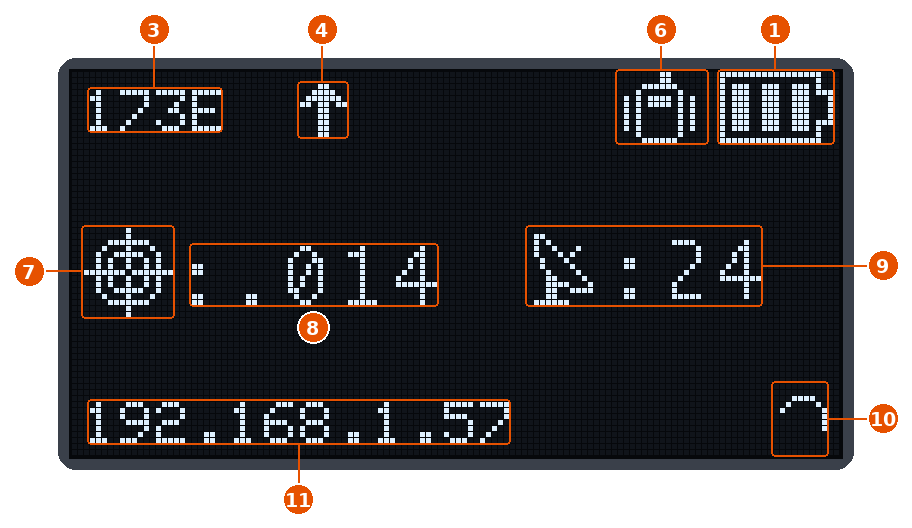
Figure 2 — Rover with the TCP server
RTK fix, TCP server on, a computer reading the positions, no phone on Bluetooth.
| No. | Icon | Meaning |
|---|---|---|
| 4 |  |
Data going out over WiFi: a program is connected to the TCP server. It alternates with the WiFi icon. |
| 11 | 192.168.1.57 |
Address of the station on the network, where the TCP server can be reached. Shown only while the server is running. |
The other numbers are explained in The display. The serial menu
also lists Display server IP address (7 → 8, factory Enabled), but it changes
nothing on the display: the address appears whenever the TCP server is running, without
the port, and not for the UDP server.
Remote configuration
Remote config and Password turn the TCP server port into a way to change the settings from a distance. Both always apply to every profile. With the Password empty, remote configuration is off and the port only carries data, whatever Remote config says. Any raw TCP client works (no telnet negotiation).
| Remote config | How it works |
|---|---|
| Console | The port carries the data as usual. Send nothing for at least 2 seconds, then type +++: the station answers == MS2net remote configuration == and Password:. Type the password (shown as *) and Enter: after OK the serial menu opens in the same connection, and the data stops for that client. |
| Web page | The port carries no data: whoever connects is asked for the password at once. After OK the station enters Config mode and the page can be opened over the network; rover or base work stops until Exit. Requires Configure Mode WiFi. |
- The password must be typed within 60 seconds;
Ctrl-CorEsccancels (Cancelled), a wrong password getsAccess denied. In both cases the station closes the connection. - One remote session at a time; with Console the other clients keep receiving data.
- Closing the main menu with
xends the session and closes the connection; losing the connection ends it too.
A silent session restarts the station
A remote session with no input for 2 minutes is treated as a hung connection and the
station restarts to free itself. Close the menu with x when you are done. Anyone
who reaches the port and knows the password can change every setting, restart or
switch off the station (S in the System menu: it can then only be switched on by
hand): use a password not used elsewhere.
The serial menu can also be reached over Bluetooth, without a password: see Using the serial menu › Remote access.
UDP Server
The station broadcasts the data on the local network: every program listening on that port, on any computer of the same network, receives it without opening a connection. Port 10110 is the usual one for NMEA over the network, and many navigation programs listen on it by default.
| Field | What it does | Values | Factory | Serial |
|---|---|---|---|---|
| UDP Server | Turns the broadcast on. | on, off | off | 7 → 6 |
| Port | UDP port of the broadcast. | 1 to 65535 | 10110 | 7 → 7 |